Teaching my smart sprinklers new tricks!
How I leveraged Claude Code to reverse engineer and integrate my sprinklers into my smart home ecosystem!
I have these Oto smart sprinklers and I love them; they are perfect for my lawn which is just big enough to need sprinklers but not big enough for a more complex irrigation system. They’re well designed, tech-forward, app‑driven, and smarter than most other sprinkler systems out there. But they live outside of my HomeKit universe, which requires me to manage schedules and automation across multiple apps making the overall experience clunky and frustrating at times. There is Homebridge a co-platform to HomeKit where you can build and run open-source plugins maintained by a hobbyist community but there weren’t any plugins (yet) for this product there and creating one from scratch was difficult because Oto doesn’t officially publish any APIs.
Reluctantly I accepted the status-quo, till one day I found something interesting.
I had recently setup Pi-hole because I wanted to tamp down on the ad tracking at home and when I was looking at the DNS query logs, I noticed some interesting entries.
oto-cloud-service-ems-prod-716180884817.us-central1.run.app
oto-cloud-service-scheduler-prod-716180884817.us-central1.run.app
oto-cloud-service-unitcall-prod-716180884817.us-central1.run.app
These obviously looked like the Oto device service endpoints, which sparked my curiosity! However this only logged the dns entires, not the full call patterns themselves so needed to do a bit more digging. So, I spun up my Claude Code and go to work!
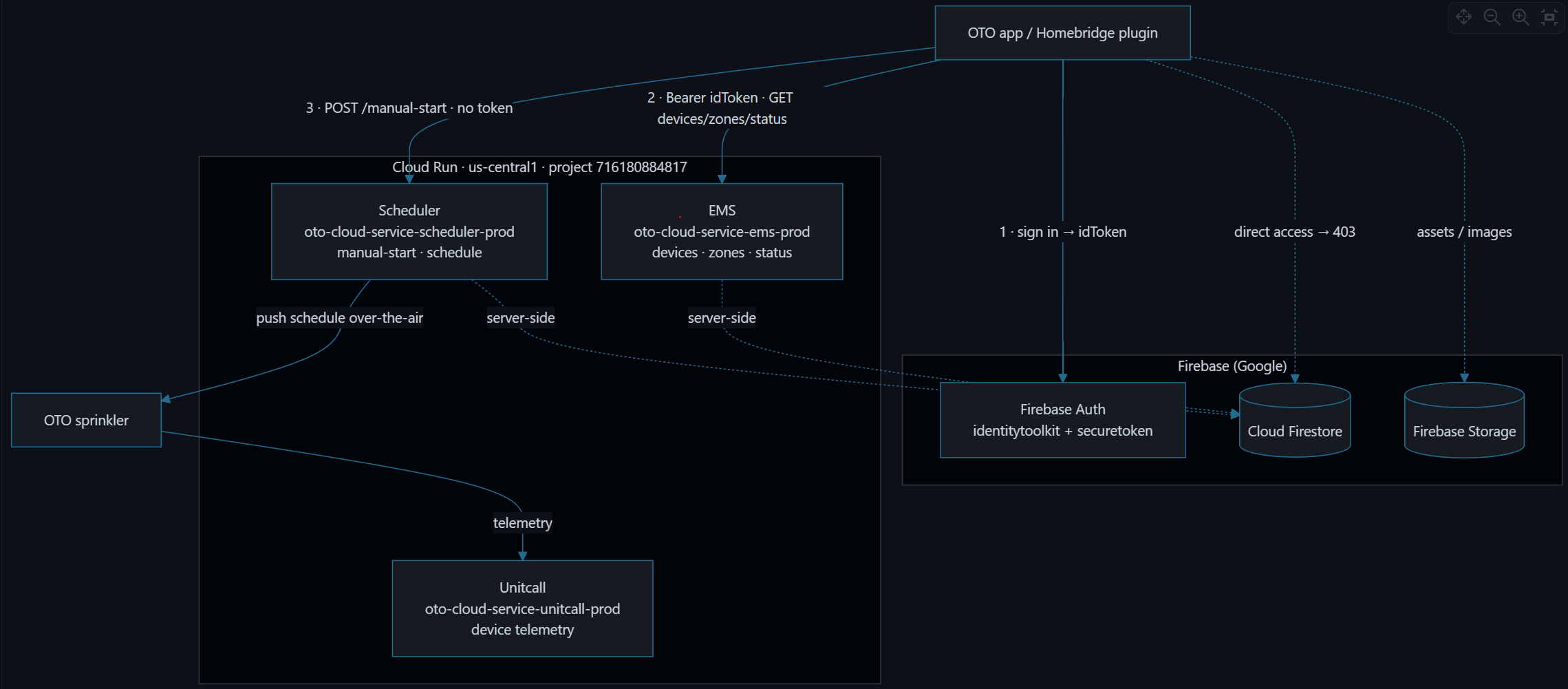
From the Pi-hole logs, Claude was able to dissect out not just all of the dns queries made by my Oto devices but how they service was setup like GCP firebase/store, JWT token-based auth-model infact enumerated out a full service-side architecture! Please read Appendix A - Oto Service Architecture on GCP below.
This was a significant and impressive milestone achieved by Claude but still didn’t unearth the critical details around the API structure of this Oto service necessary to build out a working homebridge plugin. For that I’ll need a more complex forensic setup.
In an attempt to capture live network traffic I setup mitmproxy with wireguard on my desktop; enrolled and connected my iPhone to the mitmproxy and VPN; and started up the Oto App to generate traffic. Then I pointed Claude Code to the mitmproxy logs and lo and behold it was able to extract out the full AI layer! Include how the JWT based authentication model works against which firebase endpoints, the calls to get accessories and zonal information, and the calls to start watering! For more details on the API layer, please read Appendix B - Oto Service APIs.
The fascinating thing here was not just that Claude Code was reverse engineer all this but also managed to surface inconsistencies in Oto service API layers. For example, where it sees their EMS service expose a POST /account/{uid}/run endpoint which asks for a zone_id but these values are not externally queryable in their Cloud Firestore. Why expose this API to a device if it’s not callable? Is this mean for a separate internal only service? Is this a bug? Not sure, but definitely an interesting analysis and read.
Now it was just a matter of authoring the plugin itself, which was pretty straightforward and just a reflection of the object model presented by the APIs.
-
A single dynamic platform/bridge to surface all Oto products.
-
One accessory per Oto device exposed into the HomeKit IrrigationSystem accessory.
-
Each zone surfaced as a valve associated with each accessory.
Please find the code and published npm plugin package.
Once this plugin is successfully installed and configured on your Homebridge instance and added to your Apple HomeKit. Here is the final product!
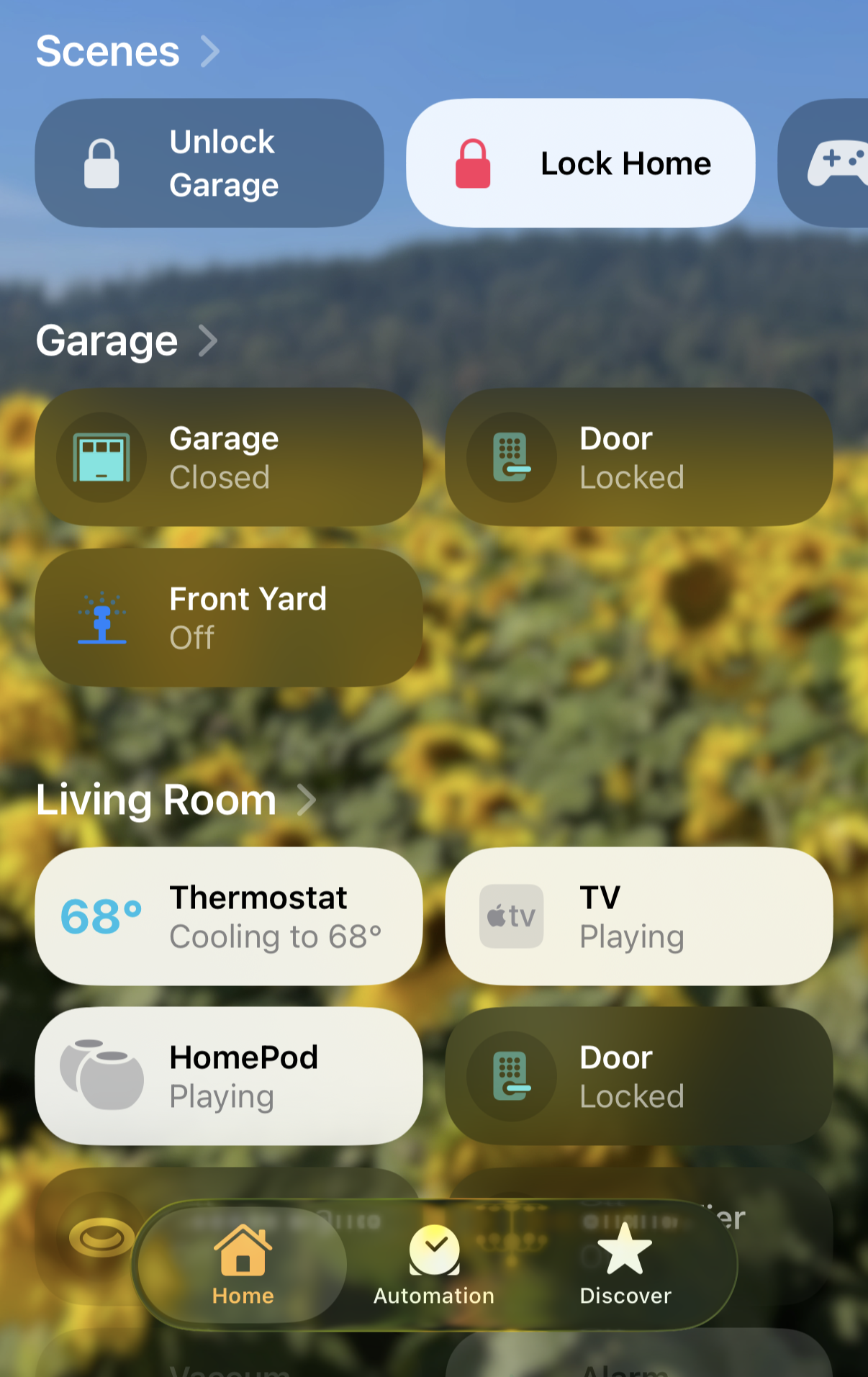
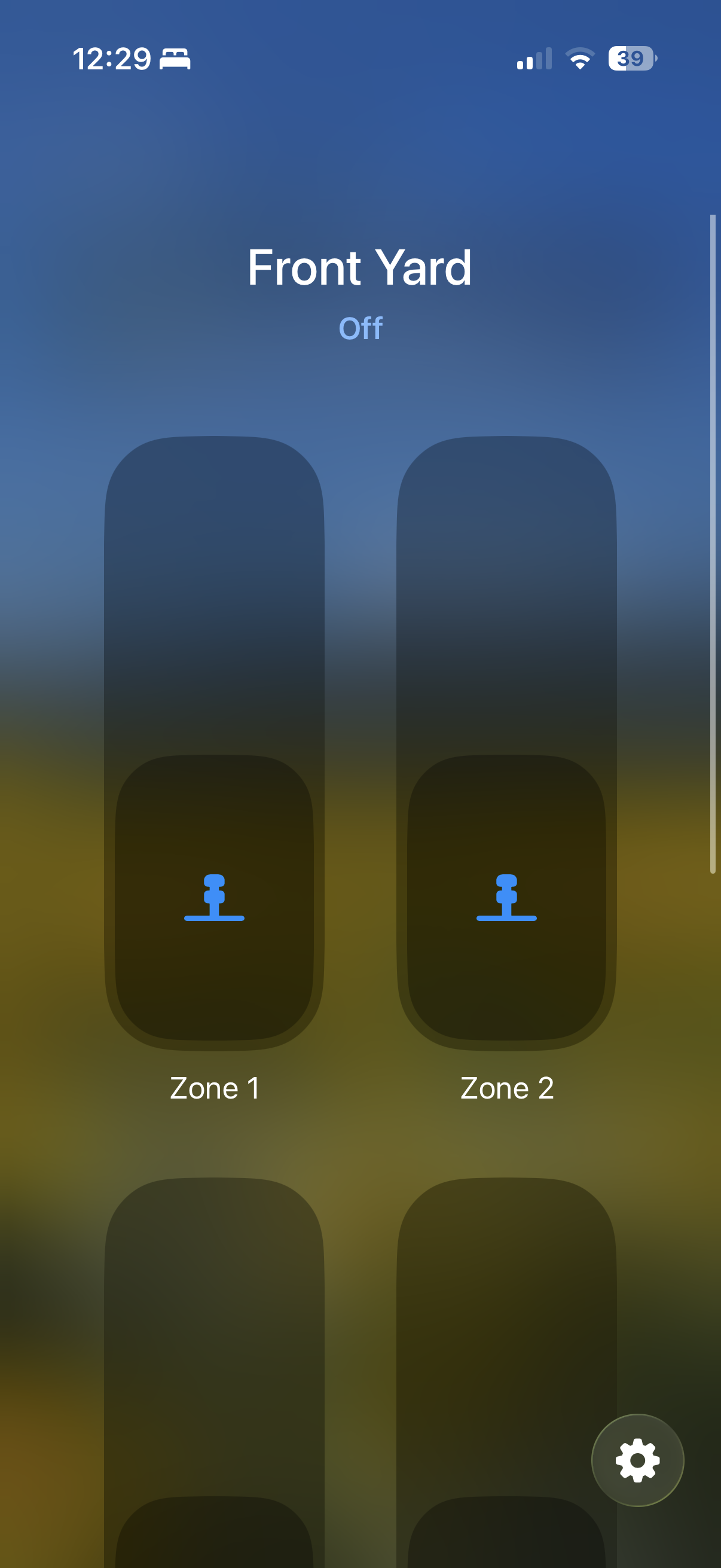
This is by no means a finish product with a couple issues I’d like to fix; zone names not come through correctly; making these switches more intelligent (would love for plugin to auto sequence each of the zones and just expose a single water button); and a couple others.
This experience has left me in awe of an effectively used Claude Code is really capable of; and to a larger extent how much the barrier for entry has reduced for making software more malleable and extensible to meet your needs. This is also equal parts terrifying; I’m just a home automation hobbyist here but imagine if I wasn’t…
Anyways this was a really fun project which I learned a lot from and now I’m eyeing all of the other devices in my house!
Appendix A - Oto Service Architecture on GCP
-
DNS: identitytoolkit.googleapis.com
-
Google Identity Toolkit — the Firebase Auth REST APIThey didn’t roll their own auth. Login is Firebase email/password.
-
DNS: securetoken.googleapis.com
-
Firebase’s token refresh serviceClassic Firebase session model: short-lived JWT + long-lived refresh token.
-
DNS: firestore.googleapis.com
-
Cloud FirestoreApp/device state lives in a NoSQL document store.
-
DNS: firebasestorage.googleapis.com
-
Firebase Storage (blobs)Assets — images, maybe firmware — not control data.
-
DNS: *.run.app
-
Google Cloud Run default domainsThe custom backend is serverless containers, not GKE/GCE/App Engine (each has a different domain).
The run.app hostnames are the richest. Cloud Run’s default URL format is <service>-<project-number>.<region>.run.app, so each name unpacks into a full deployment description:
oto-cloud-service-ems-prod  -  716180884817  .  us-central1  .  run.app
└────────── service ───────┘   └─ project # ─┘  └─ region ─┘
From that pattern alone:
-
Three microservices, not a monolith: ems, scheduler, unitcall. The names hint at responsibilities — an EMS (”equipment/entity management”) data service, a Scheduler, and a “Unitcall” that (payloads later confirmed) is device-to-cloud telemetry with no client-facing control.
-
Environment separation. The -prod suffix says there are other environments. (Watching a little longer, the app also resolved an ...-ems-canary10-... host — so they run canary deployments with traffic splitting.)
-
One GCP project, number 716180884817, baked right into the hostname. Its human-readable project ID, which surfaces in the Firebase config, is oto-test-3254b — the “-test-” in a production project ID being its own small tell.
-
Single region: everything is us-central1 (Iowa). No multi-region footprint.
Put together, it’s a textbook “Firebase + Cloud Run” mobile stack: Firebase handles auth and data, a handful of Cloud Run services carry the custom logic, Firestore is the system of record, and the sprinkler itself phones home over a dedicated telemetry service.
Appendix B - Oto Service APIs
Auth is stock Firebase
Sign in for a 1-hour JWT; refresh before it expires. Nothing custom:
POST https://identitytoolkit.googleapis.com/v1/accounts:signInWithPassword?key=AIza…
  { "email": …, "password": …, "returnSecureToken": true }
  → { idToken, refreshToken, expiresIn: "3600", localId: "" }
localId is your account UID, and it’s the key that threads through every EMS path.
Discovery and status come from EMS
All EMS calls carry Authorization: Bearer <idToken>:
GET /account/{uid}/devices                    → controllers (unitName, userName)
GET /account/{uid}/device/{deviceId}/zones    → zones (zoneId, zoneName, …)
GET /device/{deviceId}/status                  → { pathIndex, scheduleId, … }
Two quirks worth knowing. EMS returns 400 Bad Request** if you send Content-Type: application/json on a GET** — it has to be omitted on reads. And status is device-level only: pathIndex tells you the unit is watering something (null = idle), never which zone. There’s no per-zone active flag, so in HomeKit every zone on a controller reflects the same busy state.
Control: one open endpoint
Here’s the request the app sends when you tap Water Now:
POST https://oto-cloud-service-scheduler-prod-716180884817.us-central1.run.app/manual-start
Content-Type: application/json

{
  "uid": "",
  "deviceId": "oto5736825",
  "zoneId": "FhFU1lfRN3IhyxPX",
  "wateringQuantity": 31.75
}
Response 200:
{
  "message": "Manual event successfully scheduled",
  "scheduleId": "f2MMHk05",
  "schedule_item": {
    "zoneId": "FhFU1lfRN3IhyxPX",
    "zoneName": "Left Front Yard",
    "zoneGroupId": null,
    "irrigationQuantity": {
      "path": { "waterVolume_L": 323.94 },
      "scheduled": { "wateringDepth_mm": 31.75 }
    },
    "runtime_min": 22.95,
    "scheduleItemStatus": "SCHEDULED",
    "scheduleItemType": "MANUAL"
  }
}
Notice what’s not there: no Authorization header. /manual-start is an open Cloud Run endpoint that returns 200 with no token — it just needs a uid, deviceId, zoneId, and an amount.
wateringQuantity** is a depth, not a duration**
The one genuinely interesting design choice. wateringQuantity is millimetres of water, and the backend converts it to a runtime using each zone’s precipitation rate. In the response above, 31.75 mm (≈ 1.25”) became a 22.95-minute run delivering 323.94 litres.